
How to Translate Video Subtitles
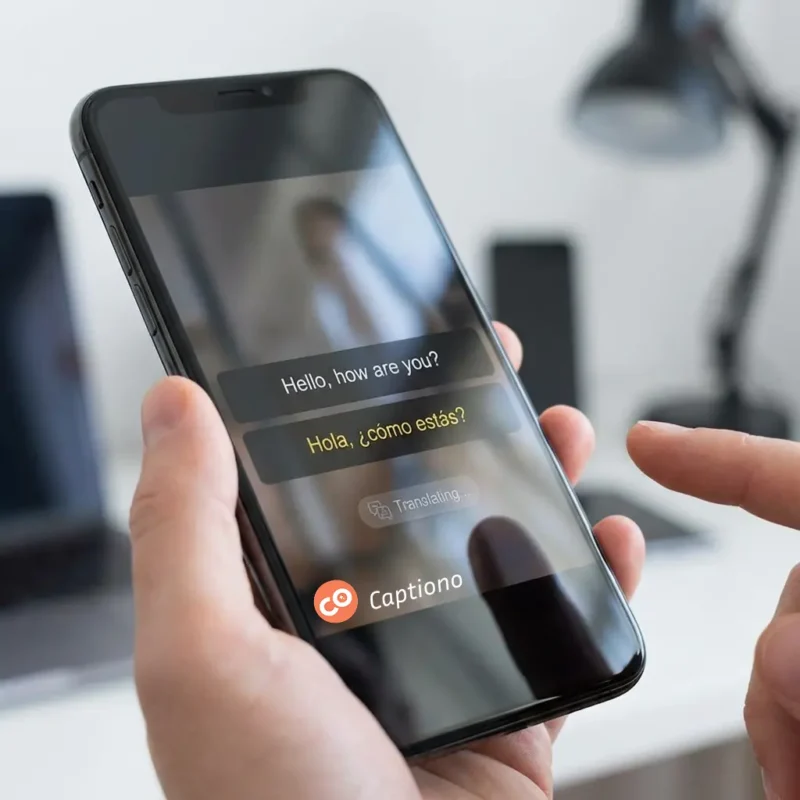
How to Translate Video Subtitles: A Step-by-Step Guide to Going Global
Have you ever watched a viral video from another country and felt left out of the conversation? Or maybe you're a creator whose content has plateaued, unable to break into new markets. The secret weapon for smashing these barriers is effective subtitle translation. It's not just about swapping words; it's about bridging cultures and expanding your reach exponentially.
In this comprehensive guide, we'll walk you through the entire process of subtitle translation. You'll learn why it's crucial, explore different methods, and discover how modern AI tools like Captiono are revolutionizing the way we make content accessible to a global audience. Let's dive in and unlock the world!
Why Subtitle Translation is Your Key to a Global Audience
Simply put, translating your subtitles is one of the most impactful investments you can make in your content's future. It's the difference between speaking to a room and speaking to the world.
Expand Your Reach and Grow Your Audience
By translating your video subtitles, you instantly make your content accessible to millions of non-native speakers. This isn't just about crossing borders; it's about connecting with diverse communities within your own country and tapping into new, engaged viewer bases on platforms like YouTube, TikTok, and Instagram.
Boost SEO and Discoverability
Search engines like Google can't "watch" your video, but they can index the text within your subtitles. When you add translated subtitles, you're providing keywords in multiple languages. This dramatically increases the chances of your video appearing in search results across different countries, giving you a powerful SEO advantage.
Enhance Accessibility and Inclusivity
Subtitle translation is a cornerstone of digital accessibility. It allows people who are deaf or hard of hearing to enjoy content in their native language. Furthermore, it helps second-language learners follow along more easily, making your content more inclusive and socially responsible.
Getting Started: File Formats and Preparation
Before you begin the subtitle translation process, it's essential to understand the foundation: the subtitle file itself.
The Most Common Subtitle Format: SRT
The SubRip Subtitle file, or .srt, is the universal standard. It's a simple text file that contains:
- A sequential number for each subtitle block.
- The start and end timecodes.
- The subtitle text itself.
Because of its simplicity, it's the most compatible format for platforms like YouTube and Vimeo. When you use a tool like Captiono to create automatic subtitles, you can typically export your results directly as an SRT file, making the next steps seamless.
Other Key Formats: VTT and TXT
- WebVTT (.vtt): Similar to SRT but designed for HTML5 video players, often used on websites.
- TXT (.txt): A simple text file containing only the dialogue, without timecodes. Less common for direct use but can be a starting point.
Ensuring you have the right file format is the first step to a smooth subtitle translation workflow.
Methods for Translating Subtitles: From Manual to AI-Powered
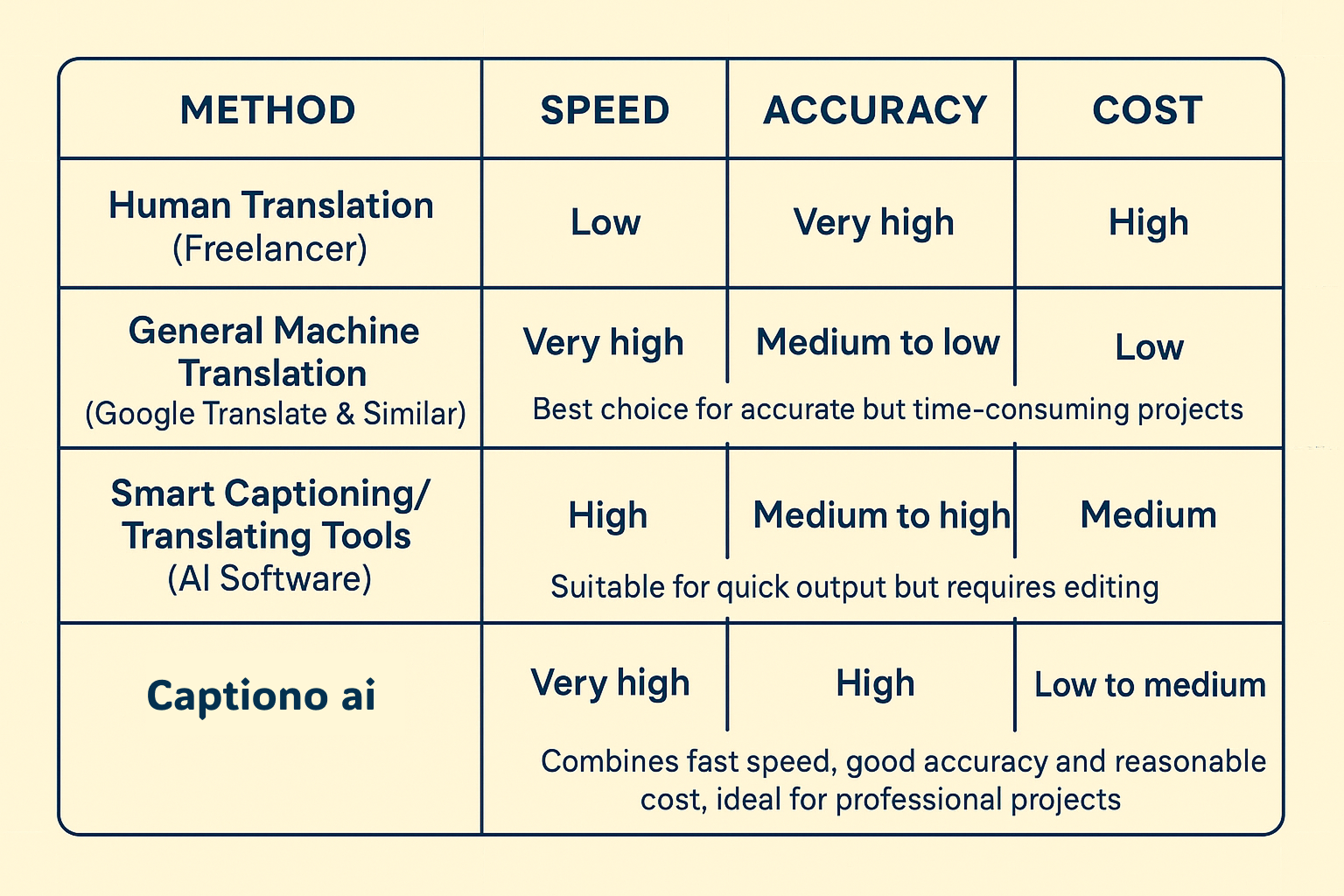
There are several paths you can take for subtitle translation, each with its own pros and cons. Your choice will depend on your budget, time, and required accuracy.
The Professional Human Translator (High Accuracy, High Cost)
This method involves hiring a professional translator or a specialized agency.
- Pros: Delivers the highest quality, with nuanced cultural adaptation (localization) and perfect grammar.
- Cons: Can be expensive and time-consuming. Not ideal for creators on a tight budget or with tight deadlines.
DIY with Machine Translation (Low Cost, Variable Quality)
This approach uses free tools like Google Translate. You copy the text from your SRT file, paste it into the translator, and then manually reinsert the translated text back into the file.
- Pros: Completely free and fast for short texts.
- Cons: Extremely prone to errors, awkward phrasing, and a complete lack of cultural context. It often produces "robotic" and inaccurate subtitles.
The Modern Hybrid: AI-Powered Subtitle Tools (Best Balance)
This is where next-generation applications like Captiono shine. They combine the speed of AI with the oversight of a human.
- Pros: Incredibly fast, cost-effective, and surprisingly accurate. They handle both the transcription and subtitle translation in a single, integrated workflow, saving you hours of manual work.
Cons: While highly accurate, a quick human review is always recommended to catch any minor errors or improve flow
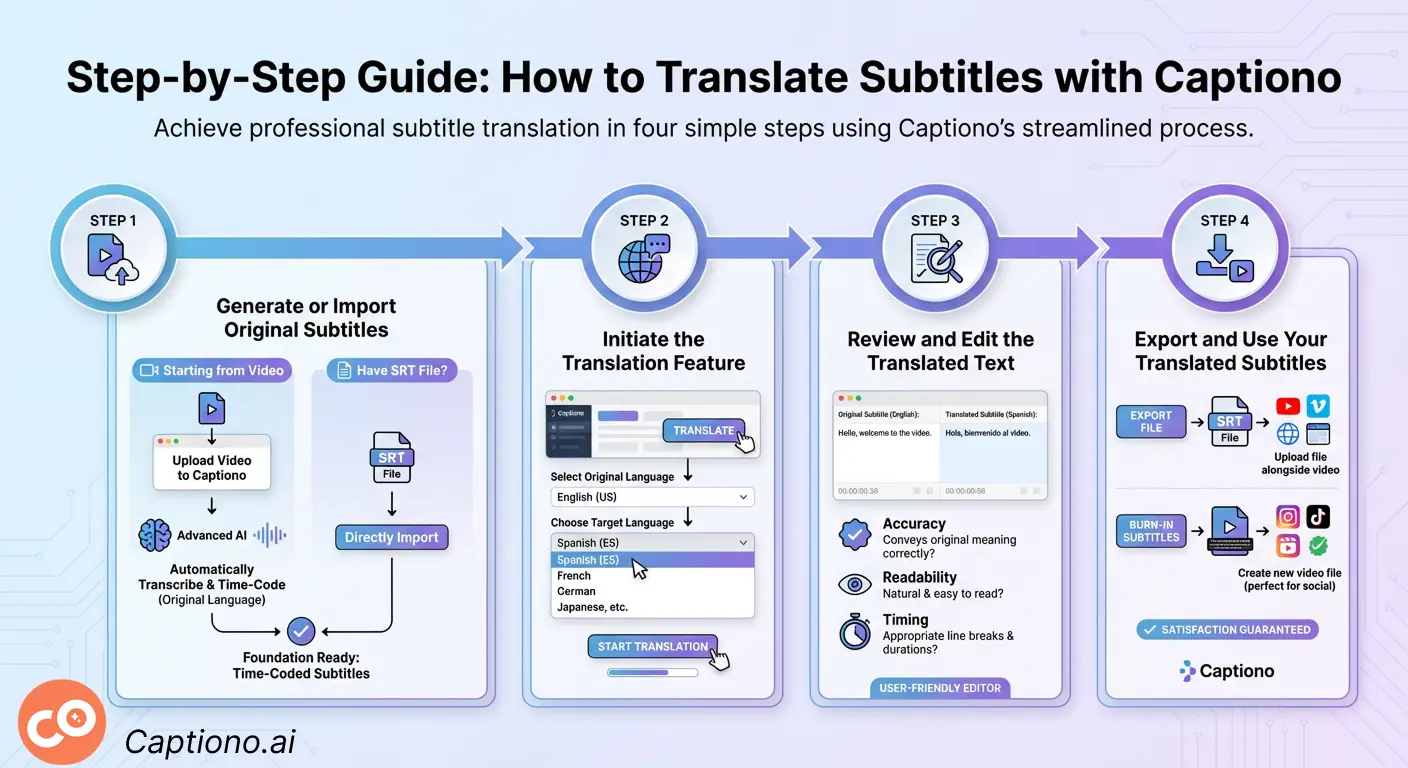
Step-by-Step Guide: How to Translate Subtitles with Captiono
Using a dedicated tool like Captiono streamlines the entire process. Here’s how you can achieve professional subtitle translation in just a few steps.
Step 1: Generate or Import Your Original Subtitles
If you're starting from a video without any subtitles, simply upload your video file to Captiono. Its advanced AI will automatically transcribe the speech into highly accurate, time-coded subtitles in the original language. This is your foundation. If you already have an SRT file, you can import it directly.
Step 2: Initiate the Translation Feature
Once your subtitles are ready, look for the "Translate" button within the Captiono interface. Select the original language of your video and then choose your target language from a wide list of supported options.
Step 3: Review and Edit the Translated Text
This is the most crucial step for quality control. The AI will generate the translated subtitles almost instantly. Review the text to ensure:
- Accuracy: Does the translation convey the original meaning correctly?
- Readability: Is the text natural and easy to read at a glance?
- Timing: Are the line breaks and durations still appropriate for the new language?
Captiono's user-friendly editor makes this review process quick and simple.
Step 4: Export and Use Your Translated Subtitles
Once you're satisfied, export your new translated subtitle file (e.g., SRT ). You can now upload this file to your video platform alongside your video, or use Captiono to burn the subtitles directly into a new video file, perfect for platforms like Instagram Reels or TikTok that don't always support external subtitle files.
Best Practices for High-Quality Subtitle Translation
Great subtitle translation isn't just about the words; it's about the viewer's experience. Follow these tips to ensure your subtitles are professional and effective.
Keep it Concise and Readable
Viewers need to read subtitles quickly. Aim for a maximum of two lines per subtitle and ensure each one stays on screen long enough to be read comfortably (generally 1-3 seconds). The AI in Captiono automatically handles timing, but always preview the final result.
Focus on Localization, Not Just Translation
Localization means adapting the content to the target culture. This includes idioms, humor, measurements, and cultural references. A direct translation might not make sense. For example, "that's cool" might be directly translated, but a localized version would use the equivalent slang in the target language.
Maintain Consistency in Terminology
If you have a series of videos, create a glossary of key terms and their translations. This ensures you always translate specific words (like your brand name or technical terms) the same way, building consistency and professionalism across all your content.
Conclusion: Break Down Language Barriers and Connect with the World
Subtitle translation is no longer a complex, expensive task reserved for major studios. It's an accessible and powerful strategy for any creator, educator, or business looking to grow. By translating your subtitles, you open doors to new audiences, enhance your content's accessibility, and boost its global discoverability.
With intuitive, AI-driven tools Captiono, the process is faster and more accurate than ever. You can achieve high-quality results without needing a background in linguistics or video editing. So, why limit your voice? Start translating your subtitles today and share your message with the world
What is the best format for translated subtitles?
The SRT (.srt) format is the most universally accepted and is compatible with almost all major video platforms, including YouTube, Vimeo, and Facebook. It's the safest and most recommended choice.
Can I use free online translators for subtitle translation?
While you can, we don't recommend it for professional results. Free machine translators often produce inaccurate and awkward translations that lack cultural nuance. AI-powered tools like Captiono provide a much better balance of speed, cost, and context-aware accuracy.
How do I add translated subtitles to a YouTube video?
After uploading your video to YouTube, go to YouTube Studio. Select "Subtitles" for that video, click "Add Language," and choose your target language. Then, click "Add" under the subtitles column and upload your translated SRT file.
What's the difference between subtitles and captions?
Subtitles assume the viewer can hear the audio but doesn't understand the language (so they only transcribe dialogue). Closed captions (CC) are designed for viewers who cannot hear the audio, so they include dialogue plus non-speech elements like "[music]" or "[door creaks]." Subtitle translation typically focuses on the spoken dialogue.

download box
powerful video editor based on artificial intelligence


Recent posts


Categories


Recent Comments